You know that voice in your head that says “you already have three tools that do this, you do not need a new one”?
I ignored that voice and built my own SQL IDE. Datagrip is expensive, DBeaver is boring. Then, sqltemple born: sqltemple.dev
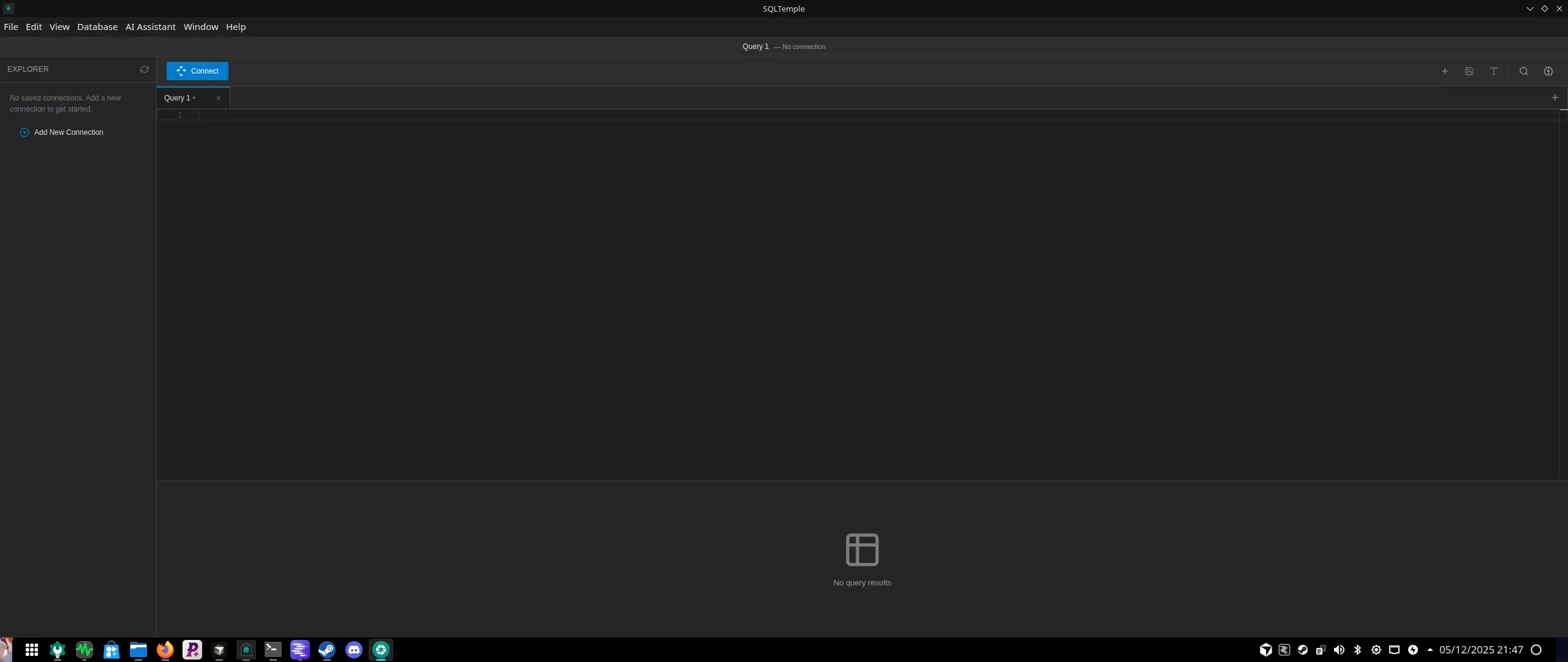
What started as a small experiment to scratch a personal itch ended up turning into SQLTemple, an open-source desktop app I now use to work with databases every day at my 9 to 5. It has an editor, schema explorer, visual tools, and an agent powered by AI that can reason about schemas and queries.
This is the story of why I did it, how it works under the hood, and what I learned while turning a messy prototype into something I am now shipping to other people for free.
Short answer
SQLTemple is my open-source SQL IDE built with Electron, React, TypeScript, Monaco, local SQLite, and an AI agent that can use real database tools. I built it because database work should feel closer to a developer environment than a cramped admin utility.
Key takeaways
- The app separates Electron main-process database work from a React renderer.
- The AI layer is tool-based: it can inspect schemas, sample rows, plans, and queries instead of guessing from vague text.
- SQLTemple remains useful without AI; AI is an optional workflow upgrade powered by user-configured providers.
- Shipping it as a real desktop product forced installers, updates, versioning, CI, and documentation.
Why build a new SQL IDE at all
For years of my career I lived in the usual database tooling, using DBeaver or corporate-offered DataGrip. Open a heavy client, connect, write SQL in a cramped text area, run it, squint at the results grid, then copy the query into a separate editor to make it nicer. Every tool did most of what I needed, but nothing felt like a place I wanted to live in all day. Also, almost none had the AI features I was really looking to use.
I wanted three things at the same time:
- I wanted an editor that felt as familiar as my coding setup. Proper keyboard shortcuts, multiple tabs, serious completion, and the same comfort I have in a code editor.
- I wanted a database companion that understands structure, not just strings. Tables and relations, plans, stats, and the story behind why a query behaves the way it does.
- And; I wanted an AI layer that could sit beside me rather than above me. Something that can propose queries, explain them, optimize, and inspect actual schemas, not just hallucinate around vague table names.
The combination of those three pushed me over the edge. I opened a new repository, wrote the first commit message, and went down the rabbit hole.
From proof of concept to daily driver
The early days of SQLTemple looked exactly like every classic pet project.
First step was just getting something on screen. Electron gave me a simple desktop shell, React took over the renderer, and Monaco became the heart of the editor. The first time I connected to a local Postgres instance, ran a simple select, and saw rows inside my own app, I knew this would not stay as a weekend pet project.
Then came the basic creature comforts. Tabs instead of a single editor area. A schema explorer so I could stop writing select star from table name just to remind myself of the columns. A history of executed queries so I could jump back and forth while exploring a schema.
At this point I had a tool that was already good enough for me. It connected to Postgres, let me write queries in a modern editor, and gave me results in a grid that did not fight me. It was lightweight, kinda pretty, and nice to use.
But the codebase looked exactly like what it was: a fast and dirty experiment. The next months were a refactor action from a “this works on my machine” project into an app with an actual structure.
I split the Electron main process from the renderer in a strict way. The main process became responsible for database connections, AI calls, local storage with local SQLite, the menu and auto update machinery. The renderer became a pure React app concerned only with state, views, and user interaction.
Once that boundary was clear, everything else started to feel less fragile. I could evolve the React side as a normal web app, while keeping the desktop specific logic where it belonged.
How SQLTemple is wired under the hood
At a high level, SQLTemple is a fairly classic Electron plus React plus TypeScript application, but with a few choices that came directly from the kind of tool I wanted to use.
The Electron main process is where the heavy lifting lives. It knows how to talk to Postgres using a dedicated client. It manages connections, executes queries, fetches schema information, and stores history, settings, and connection data in a local SQLite database. It also handles application menus, native dialogs, and the auto update system built on top of Electron Forge and GitHub releases.
The renderer is a React app that treats the main process as a set of services available through typed IPC calls. The editor view uses Monaco, which gives me language aware editing for SQL, along with support for themes, snippets, and the usual editor features developers expect.
On top of that editor there is a layout that wraps the rest of the tool. A sidebar with connections and schemas. A panel that shows table details, sample data, indexes, and relations. A result grid that can handle large result sets through virtualization, with column controls, resizing, and export actions. A living history view that records what I have run and when.
There is also a thin configuration layer that exposes things like AI providers, model choices, and keyboard preferences. All of it lives in the same local storage and can be synced or backed up if needed.
This stack is not exotic or extravagant. The interesting part is how it made it possible to layer more advanced features on top without needing to constantly fight the foundation.
Adding an AI agent to the mix
SQLTemple was always meant to have AI in the loop, but the early approach was very direct. Take a prompt, send it to a provider, get a response back, maybe parse some SQL out of it, and paste that into the editor.
Useful, yes. Integrated, not really.
Over time I changed the way AI fits into the app. Instead of thinking of it as a suggestion box, I started treating it as an agent that can access tools. In practice this means the agent has ways to:
- Call the database client as a tool to inspect schemas, sample rows, and execution plans.
- Generate or modify SQL queries in response to natural language requests.
- Explain existing queries by breaking down joins, filters, and aggregation logic.
- Inspect result sets and answer questions about them.
- Reason about complex problems and find the answer by itself.
The sidebar in SQLTemple is where this agent lives. It keeps a conversation history, shows which tools were called, and displays traces so I can see why it made certain choices. When the agent proposes a query, I can insert it into the main editor or run it directly. When it explains something, it points back to the actual query text and plan data.
I like this approach because it keeps me in control. The agent is not a black box that secretly touches my database. Every tool call is explicit, and the transcript is visible. It feels like a colleague that can type very fast and never gets bored of reading query plans.
On the configuration side I made the AI layer flexible. It supports multiple providers and models, from larger general models to smaller and cheaper ones. The settings persist across sessions and live in the same local store that handles the rest of the app state.
Turning a personal tool into a shareable product
At some point an interesting thing happened. I started thinking this could really be some open-source app that I could share with others. Maybe even be a big project.
That changed how I thought about the entire project. It was no longer enough for the app to work on my machine. It had to install cleanly, update itself, and at least attempt to behave like a normal desktop product.
This pushed a wave of changes that had nothing to do with database design or editor tricks.
I wired up Electron Forge to produce installers for macOS, Windows, and Linux. I added a Homebrew cask so that macOS users can install it with a single command. I configured auto updates, so I can ship a new version and let the app handle the rest.
I created a small website as a front page. Just a simple fast static site that explains what SQLTemple is and links to downloads and documentation.
I cleaned up the repository. Added a clear readme, a contributing guide, and a license. Set up continuous integration to lint and type check every change, and to build releases from tags. Placed semantic versioning in front of it, so I can reason about breaking changes and new features.
None of that is glamorous or even super hard work, but it is the difference between a git repository that happens to contain an app and a project that feels safe to try.
What it feels like to use SQLTemple
A normal session with SQLTemple starts the same way it did on the first day. I pick a Postgres instance and open a connection. The schema explorer populates, the editor opens with a new tab, and I start writing queries.
The difference now is what I reach for when I hit a question.
If I am exploring an unfamiliar schema, I can ask the agent to map out relevant tables for a given business concept. It reads the actual catalog, follows foreign keys, and suggests entry points. If a query feels slow, I can have the app fetch and render the execution plan, then ask for an explanation that points to the specific nodes that cause trouble.
When I am shaping a new report, I often start with a natural language description in the agent, let it propose a first draft, then refine it manually in the editor like any other query. The AI layer does the grunt work, I keep the final say.
The tool still works fine without any AI configured. You can run it as a classic SQL client with a modern editor. That was important to me. The AI layer is an upgrade powered by the user own API keys, not a hard requirement.
Lessons learned from building my own database tool
This project taught me a few things that go beyond SQL and desktop apps.
The first is that the tools you use every day are worth investing in. Building a custom IDE for a specific domain sounds extravagant, but the payoff is real when you spend hours per week inside it. Small design decisions compound into a smoother mental flow.
The second is that agent style AI only shines when it has actual tools. Giving a model raw text access to your schema is nice. Giving it structured functions that can fetch schema data, sample rows, and run queries under supervision is much more interesting. The whole app became more useful once I treated the model as a careful operator rather than an oracle.
The third is that shipping to other people forces discipline in a way pure personal projects never do. Auto updates, versioning, installers, crash handling, readmes, all of that exists mostly because I did not want to break things for friends who were kind enough to test the app.
Finally, I was reminded how fun it is to own the entire stack of a tool. From database client to UI, from internal storage to release pipeline. That kind of end to end view is rare in large codebases, and very educational.
Where SQLTemple goes next
SQLTemple today is already a tool I am comfortable using as my main SQL interface at work. It has a modern editor, a schema aware explorer, result views, and an AI agent that can help with planning, exploration, and explanation.
There is still a long list of things I want to add. More database engines besides Postgres. Better visualization of relationships and dependencies. Deeper integration between the agent and the history of queries across projects. Smarter help around safety, such as explaining destructive statements before they run.
For now I am happy with one simple fact: the next time that small voice tells me I do not need another tool, I will remember SQLTemple and be happy. Sometimes building your own thing is exactly the right answer.
And in this case, it gave me the SQL IDE I had wished someone else would build.